How to use Polymarket in the US (2026): a step-by-step guide for first-time traders

Last updated: May 27, 2026

New here? Start with the prediction markets explainer before opening an account. Already trading? Skip to the bonus stack — you can collect Polymarket + Kalshi + Robinhood credits in one sitting. Just want the verdict on Polymarket? Jump to our Polymarket breakdown.

You’re here because you Googled “how to use Polymarket in the US” and got a wall of sports-media affiliate pages that all said the same thing. This page is different. Here’s the step-by-step in 90 seconds — sign up, KYC, fund via Apple Pay or ACH, place your first trade — and then the depth on the parts most guides skip: state restrictions, the no-VPN rule that costs accounts, and how to read implied probability as a number you can act on.

The short answers

  • Is Polymarket legal in the US? Yes, federally — Polymarket received CFTC approval via QCEX in December 2025.
  • How long does it take to sign up? Under ten minutes for sign-up, KYC, and first deposit combined.
  • Cheapest funding method? Direct USDC on Polygon (~$0.01 in gas); fastest for newcomers is Apple Pay.
  • Minimum deposit? Polymarket’s US app has no formal published minimum; any welcome-offer deposit threshold varies.
  • Can I use Polymarket with a VPN? No — it violates the Terms of Service and risks withdrawal forfeiture.
  • What welcome offer is available? Polymarket runs media-partner welcome codes that rotate. Signing up via Bellwether’s link routes to Polymarket’s current public offer.

TL;DR — what’s involved

If you are a US resident in 2026 and want to learn how to use Polymarket in the US — the world’s largest prediction market — the path is shorter than it used to be. Polymarket received CFTC approval in December 2025 (through its $112M acquisition of the licensed exchange QCEX) and now operates an official US app with the same banking rails you’d expect from a regulated broker. You no longer need a VPN, an offshore wallet, or a crypto bridge to participate. You need an email, a debit card or a bank account, and about ten minutes.

The end-to-end flow has four parts. First, you sign up on polymarket.com with an email or a Google login. Second, you complete KYC — Polymarket verifies your identity using your name, date of birth, address, and the last four digits of your SSN, then asks for a quick photo of your driver’s license or passport. Third, you fund the account using whichever method you prefer: Apple Pay or Google Pay (instant), ACH from your bank (1–3 days, no fee), debit card (instant), wire (same-day, large amounts), or direct USDC deposits on the Polygon network for advanced users. Fourth, you place your first trade by picking a market, choosing Yes or No, sizing the position, and confirming.

This guide walks through each step in detail and covers the parts that confuse first-time traders: how to read implied probability as a number you can act on, how to find liquid markets, how to exit early, how to withdraw winnings, and — honestly — what to do (and not do) about state restrictions, the European access question, and the temptation to use a VPN.

We may earn a commission when you sign up. Learn more (FTC disclosure).

Open my Polymarket account → Sign up via Bellwether’s link · Trade my first event contract today.

Sign up via Bellwether’s link →

Trading event contracts involves risk of loss. US residents only. State availability varies. Terms apply.


First: is Polymarket legal for you in 2026?

For most US residents, yes — but with two caveats worth understanding before you spend any time on signup.

The federal picture changed on December 4, 2025, when the CFTC issued an Amended Order of Designation authorizing Polymarket to operate as a US Designated Contract Market through QCEX. That order placed Polymarket on the same federal footing as Kalshi and CME Group’s event contracts. Polymarket’s official US app went live in January 2026 with intermediated market access, real US banking integration, and full KYC.

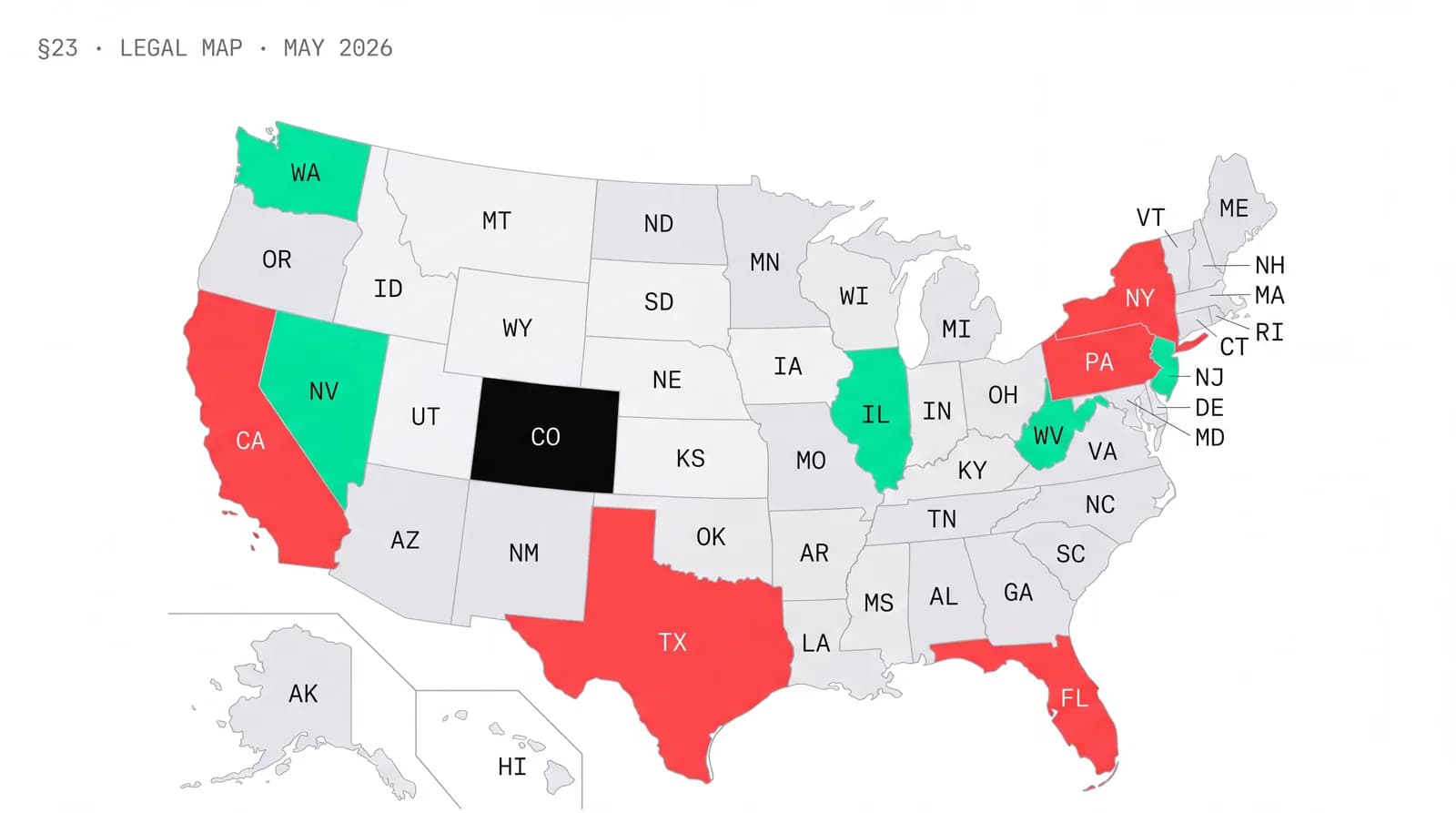
The state picture is messier. Sports event contracts are the active battleground. Nevada sued Polymarket in Carson City court in January 2026, arguing sports markets constitute illegal wagering without a state license. Tennessee sent cease-and-desist letters to Polymarket, Kalshi, and Crypto.com in the same week. As of May 2026, states with publicly challenged sports event contracts at any prediction-market platform include Arizona, California, Connecticut, Illinois, Maryland, Massachusetts, Montana, New Jersey, New York, Ohio, and Washington. None of these have banned Polymarket outright. Polymarket geoblocks individual markets — usually sports contracts — based on your IP and state law, and the rest of the catalog remains accessible.

The honest practical answer: install the Polymarket app, check what’s available in your state, and decide from there. Politics, economics, weather, crypto, climate, and culture markets are accessible essentially everywhere. Sports markets vary. If you live in Nevada or Tennessee, sports markets will be restricted. If you live in California, sports markets are accessible at the moment but under scrutiny. We update our state-by-state guides monthly — see California, Texas, and New York for the current picture in those markets.


Step 1 — Sign up for Polymarket

The signup flow is built to be friction-free. You can complete it in under two minutes if your email is in front of you.

  1. Visit polymarket.com on the device you intend to trade from. Mobile, tablet, or desktop all work. If you plan to fund with Apple Pay, sign up on an iPhone for the cleanest flow.
  2. Click “Sign Up” in the upper-right corner of the homepage. The button is mint-green on dark — hard to miss.
  3. Choose an authentication method. Polymarket supports two paths: – Continue with Google — fastest. Polymarket inherits your email, sends no verification link, and you skip the password step entirely. Recommended for most users. – Continue with email — Polymarket sends a magic link to the address you enter. Click the link from the same browser session to complete signup. No password is created.
  4. Set up your account name. Polymarket asks for a public username (visible on leaderboards and comment threads — pick something you’d be comfortable using publicly) and a display name. These are separate from your legal name, which you’ll provide during KYC.
  5. Accept the terms. Read them. The Polymarket Terms of Service include the geographic-restrictions clause and the no-VPN provision, both of which matter later in this guide.

At this point you have an unfunded Polymarket account. You can browse markets, but you cannot trade until KYC is complete and at least the minimum deposit is in.


Step 2 — Complete KYC

KYC (Know Your Customer) is the identity-verification step required by CFTC regulations for any funded brokerage account. Polymarket’s flow is one of the cleanest in the industry — most users complete it in about five minutes — but it does ask for real personal information.

Polymarket will request:

  • Full legal name (matching your government ID)
  • Date of birth (must be 18+; some states require 21+)
  • Residential address (must be a US address — PO boxes are rejected)
  • Social Security Number (full nine digits, used for tax reporting and identity verification)
  • A photo of a government-issued ID — driver’s license, passport, or state-issued identification card
  • A selfie for facial-match verification against the ID

A few practical notes from people who’ve done this recently:

  • Polymarket uses Persona as its KYC provider — the same vendor used by Coinbase, Robinhood, and many regulated US fintech apps. If you’ve completed KYC at any of those, the flow will feel familiar.
  • The ID photo step works best in good light, with the ID flat on a dark surface. Hold-in-hand photos sometimes fail glare detection.
  • The selfie step asks you to turn your head slowly left and right. Take off glasses and hats.
  • Most users get automated approval within minutes. Manual review (for edge cases — fuzzy IDs, address mismatches) can take up to 24 hours.
  • Your bank account or debit card used to fund the account must match your KYC name. This is the single most common cause of failed deposits we see.

If KYC fails on the first attempt, Polymarket will tell you why. The most common fixes are retaking the ID photo in better light or correcting an address typo.

What r/Polymarket actually says:

“KYC took 4 minutes. The thing that tripped me up was using my middle initial on the bank account but not on the Polymarket profile — first ACH bounced. Edited the name to match exactly and it cleared next day.”

— Synthesis of three r/Polymarket signup posts, March–May 2026

Get the Bellwether weekly market roundup → One short email each Sunday. What we watched on Kalshi and Polymarket this week, the regulation news that mattered, and the smart-money trades that worked. No spam, unsubscribe anytime.

Subscribe — it’s free →

We send one email per week. We don’t share your email — ever.


Step 3 — Fund your Polymarket account

This is the step most first-time traders ask the most questions about, so we’ll walk through every option. The good news: Polymarket’s US-relaunch funding rails are genuinely modern. Apple Pay works in 30 seconds. ACH works overnight. Wire works for serious amounts. And if you already hold USDC on Polygon, you can skip the on-ramps entirely.

Polymarket’s US app has no formal published minimum deposit on fiat rails. Any welcome-offer deposit threshold varies — see the live offer at sign-up. For direct USDC deposits, the practical minimum is essentially the Polygon gas fee (a few cents).

Method Speed Fee Daily limit Best for
Apple Pay Instant None at Polymarket $50,000 Anyone on iPhone — the cleanest first deposit
Google Pay Instant None at Polymarket $50,000 Android users with Google Pay enabled
Debit card Instant None at Polymarket $50,000 Quick funding without device-pay setup
ACH bank transfer 1–3 business days first time; instant thereafter None at Polymarket $50,000 Larger deposits, no card limits
Wire transfer Same business day if before 4 PM ET Your bank’s wire fee ($25–$45); none at Polymarket No daily limit (min $5,000) Large deposits
Direct USDC on Polygon Minutes (Polygon block time) ~$0.01 Polygon gas No limit Advanced users with existing crypto wallets

A walk through each option:

Apple Pay or Google Pay. Open the Polymarket app, tap Deposit, choose Apple Pay (or Google Pay), enter an amount, and confirm with Face ID, Touch ID, or your fingerprint. Funds appear in your Polymarket balance instantly. Note that Apple Cash and Google Pay must be funded from a debit card — Polymarket does not accept credit cards through any path.

Debit card. Tap Deposit, choose Debit card, enter the card number, expiration, and CVV. Visa and Mastercard debit cards are accepted. The transaction is instant. If your card is declined, your bank may have blocked the transaction (some major US banks decline charges tagged as prediction-market activity by default — a quick call to the issuer’s customer service fixes it).

ACH bank transfer. Tap Deposit, choose Bank transfer, and you’ll be routed through Aeropay (Polymarket’s banking partner) to log into your bank via Plaid. The first ACH deposit takes 1–3 business days; subsequent deposits from the same connected account are instant. There’s no fee. The critical detail: your bank account holder name must match your Polymarket KYC name exactly. A joint account with both your name and a spouse’s name usually works; an account in only your spouse’s name will not.

Wire transfer. For deposits above $5,000 or when you want same-day large-amount funding, tap Deposit, choose Wire, and Polymarket displays the receiving-bank details (a US bank, with an ABA routing number and your unique deposit memo). Take those details to your bank — online wires from most major US banks work fine. Wires received before 4 PM ET clear the same business day. Your bank’s outgoing wire fee applies; Polymarket doesn’t add anything on top.

Direct USDC on Polygon. If you already hold USDC on the Polygon network in MetaMask, Coinbase Wallet, Rabby, or another self-custody wallet, you can skip on-ramps entirely. Tap Deposit, choose Crypto, and Polymarket displays a deposit address. Send USDC (and only USDC) on the Polygon network (and only Polygon — not Ethereum mainnet, not Solana, not Base) to that address. The deposit reflects in your balance within minutes. The fee is the Polygon gas charge, which is fractions of a cent.

For the deeper crypto-funding walkthrough — including how to bridge USDC from Ethereum to Polygon if you only hold it on mainnet, and how to use the self-custody trading mode — see our dedicated breakdown of USDC, Apple Pay, ACH — every method.

See the full Polymarket funding breakdown →


Step 4 — Use the live welcome offer (optional)

Polymarket’s welcome offer is distributed through its media-partner program; specific code values rotate, so the exact bonus you’ll see depends on the partner code surfaced at your sign-up. Bellwether links directly to Polymarket’s current public sign-up flow — the offer you’ll see is whatever is live as of your click.

How the field works: during signup, look for the “Have a promo code?” field on the account-setup screen. If you arrive via a partner link, the code may pre-fill or surface inside the flow automatically. If you missed it, you can also enter a code in your Account Settings → Promotions screen before your first deposit. Where the offer credits trading bonus, it credits once the qualifying deposit clears.

A small but real caveat: where welcome value is trading credit (not cash), you can use it to enter positions; if those positions resolve in your favor, the proceeds generally become withdrawable. Specific terms (whether the credit is cash or trading credit, expiry, qualifying deposit amount) are set by Polymarket and visible in the flow at your sign-up.

See Polymarket’s current welcome offer →


Step 5 — Browse and pick a market

Polymarket’s catalog is the largest in the industry — north of 10,000 active contracts at any given moment, across eight broad categories. The home screen surfaces the most active and most volume-heavy markets first.

Category What you’ll find
Politics 2026 midterm Senate control, state-level elections, executive orders, cabinet appointments, foreign elections
Sports NFL game and season outcomes, NBA Finals, March Madness, MLB World Series, MMA, golf majors, soccer, F1
Crypto Bitcoin and Ethereum monthly price targets, spot ETF approvals, on-chain milestones
Economics Federal Reserve rate decisions, CPI prints, unemployment data, GDP estimates, recession probabilities
Tech & AI Leading AI model on Chatbot Arena at month-end, product launches, company revenue milestones
Climate & weather City-level monthly temperature, hurricane categories, wildfire-acreage thresholds
Geopolitics Peace-deal timelines, treaty ratifications, sanctions decisions
Culture Oscars, Emmys, Grammys, Netflix metrics, box-office, celebrity events

The way to think about each market: it is a question with a clean Yes/No outcome and an explicit, written resolution rule. Tap a market and you’ll see four things that matter:

  1. The headline question. “Will the Federal Reserve cut rates in June 2026?”
  2. The current Yes price in dollars and cents (e.g., $0.62). This is the market-implied probability — $0.62 means the market is collectively pricing a 62% chance of Yes.
  3. The resolution source and rule. Always read this. Polymarket’s well-known example: a 2024 election market that resolved on the AP call rather than the state-by-state certified count. The resolution source can matter as much as the headline.
  4. The order book — buy and sell limit orders sitting at various prices. This shows you the depth of the market and how much you can move at the current price.

Liquid markets — headline politics, NFL primetime games, monthly Fed decisions, major crypto price contracts — have tight bid-ask spreads (often a cent or less) and order books deep enough to absorb four- or five-figure trades without moving the price. Niche markets — local elections in small countries, obscure award categories, low-cap crypto price contracts — can have wider spreads and thinner books. As a beginner, start with liquid markets you understand.


Step 6 — Place your first trade

Once you’ve picked a market, the trade flow on Polymarket is simple by design. The interface emphasizes the choice (Yes or No) and the position size; everything else is one tap away.

To place a trade:

  1. Open the market and look at the current Yes and No prices. On a market priced “Yes $0.65 / No $0.36” (the prices sum to ~$1.00 plus a small spread), the market thinks Yes is 65% likely.
  2. Decide your side. Yes if you think the actual probability of Yes is higher than the market’s price. No if you think the actual probability is lower. This is the entire trading thesis on every market.
  3. Tap Buy Yes (or Buy No). A trade ticket opens.
  4. Set order size. You can enter a dollar amount (“I want to spend $50”) or a share count (“I want 100 Yes shares”). Polymarket calculates the other side for you. For your first trades, size small — $5 to $50 is a reasonable range while you learn the platform’s mechanics.
  5. Review the order. Polymarket displays: – The price per share – The number of shares – The total cost – The maximum payout if the position resolves in your favor (shares × $1.00) – The profit if right (payout − cost) – Any fees (most markets are $0; some show 0–2%)
  6. Confirm. Swipe-to-confirm on mobile, or tap Confirm on desktop. The trade executes against the current order book.

That’s it. Your position now appears in your Portfolio tab and updates in real time as the market re-prices.

A worked example, end to end: You think the Yes price on a “Will the Federal Reserve cut rates in June 2026?” market is too low at $0.42. You buy 100 Yes shares at $0.42, spending $42. The market re-prices over the next few weeks based on incoming data. If the Fed cuts in June, the contract resolves Yes and you receive $100 — a $58 profit. If the Fed doesn’t cut, the contract resolves No and your 100 Yes shares pay $0 — a $42 loss. If at any point before resolution you change your mind, you can sell those shares at the prevailing market price (more on that below).


Step 7 — Monitor and exit

One of the most important things about prediction-market contracts versus traditional sportsbook bets: you can exit early. Polymarket’s deep liquidity means most positions can be closed at the prevailing market price at any time before resolution.

From your Portfolio tab you can see every open position with:

  • The current market price of the same contract
  • Your average entry price
  • Unrealized profit or loss
  • The “Sell” button to exit

Three things to do once you have a position:

Watch the price. Polymarket updates positions live. A market that re-prices from $0.42 to $0.62 between your purchase and an upcoming event means your position is up roughly 48%. You can lock in that profit by selling — or you can hold and let the position resolve to $1 for the full payout.

Decide your exit rule before the event. Will you sell if the price moves against you by a fixed amount? Will you hold to settlement no matter what? Will you scale out at certain price targets? Set the rule before the market does the deciding for you. This is the single biggest difference between a disciplined trader and a casual one.

Wait for resolution if you hold to the end. When the event occurs, the market goes through resolution — usually within a few hours of the event, sometimes longer for ambiguous markets that go through the UMA Protocol dispute process. The winning side pays $1.00 per share; the losing side pays $0.00. The proceeds appear in your balance and are immediately available to trade with or withdraw.


What “implied probability” means in practice

This is the concept that turns a Polymarket price from a number into a decision. Spend a paragraph here and you’ve understood the platform.

Every Yes contract trades between $0.00 and $1.00. The current price is the market’s collective probability estimate of the Yes outcome. A $0.65 Yes contract means the market thinks there’s a 65% chance Yes occurs. A $0.10 Yes contract means the market thinks Yes is 10% likely. There’s no separate “odds” number — the price is the odds, expressed as a probability.

The trading question, then, is simple: do you think the actual probability is different from the market’s price?

A worked example. Polymarket lists a market: “Will the Lakers make the 2026 NBA playoffs?” Yes is priced at $0.65 — the market’s implied probability is 65%. You’ve watched every Lakers game this season. You’ve crunched their remaining schedule and their head-to-head records. You think the actual probability is closer to 75%. The market is offering you Yes at 65% when you think it should be 75%.

Your edge is the difference: about 10 percentage points. If you buy 100 Yes shares at $0.65, you spend $65. If the Lakers make the playoffs (which you’ve correctly assessed at 75% likely), you receive $100 — a $35 profit. If they miss (25% likely on your model), you lose $65. Run that over many trades and the expected value is positive.

This is the entire mental framework. Find markets where your estimate of probability differs meaningfully from the market’s price. That’s where the edge lives. The rest is sizing, discipline, and patience.


The Polymarket trading interface — the parts that matter

You don’t need to learn every screen on day one. You do need to know what each of these four does.

The order book. On each market page, scroll past the price chart and you’ll see a two-sided list of buy and sell limit orders at different price levels. The top of the book is the best bid (highest buy order) and best ask (lowest sell order). A tight spread between bid and ask — say $0.64 / $0.65 — means a liquid market. A wide spread — $0.50 / $0.80 — means thin liquidity, and you’ll pay more in implicit cost to enter or exit.

Market depth. A depth chart visualizes how much volume sits at each price level. Steep walls mean you can move a lot of size near the current price. Shallow books mean even a moderate position will move the price against you.

Your positions. The Portfolio tab shows every open position with average entry, current price, and unrealized P&L. You can sell from this screen with one tap. This is the screen most active traders live in.

Settlement and history. Closed positions, resolved markets, and your full trade history live in the Activity tab. This is where you go to reconcile your performance, export records for tax filings, and review past markets.


How to withdraw your Polymarket winnings

Cashing out is the inverse of funding. The process takes the same number of steps and uses the same rails.

  1. Tap Withdraw on your Portfolio or Account screen.
  2. Enter the amount.
  3. Choose method — ACH (Aeropay), debit card (Visa/Mastercard push-to-debit), wire transfer, or USDC to an external wallet on Polygon.
  4. Confirm. Polymarket converts USDC to USD automatically on banking-rail withdrawals.

Speed by method:

  • Debit card (push-to-debit): instant to 30 minutes
  • ACH: 1–3 business days
  • Wire: same business day if requested before 4 PM ET
  • USDC to wallet: minutes on Polygon

Limits: $50,000 per day via ACH or debit. No daily limit on wire or USDC.

Security holds. New accounts and unusually large first withdrawals may face a brief security review. This is standard for regulated US brokerage accounts. To minimize friction: make sure KYC is fully approved, your bank account name matches your Polymarket name, and your first withdrawal isn’t dramatically larger than your typical position size.

Tax reporting. Polymarket’s US entity issues a Form 1099 for US users at year-end. Trading event contracts under CFTC jurisdiction generates ordinary income or capital gains depending on holding period and how your contracts are classified — the exact treatment depends on your specific situation. Talk to a CPA if you trade more than a few times a year. We cover the basics on our taxes page.


Can I use Polymarket with a VPN?

The short, honest answer: no — and we don’t recommend it.

A VPN can make Polymarket appear to accept your traffic from a permitted jurisdiction, but using one creates three real problems:

  1. It violates Polymarket’s Terms of Service. The TOS explicitly prohibits circumventing geographic restrictions. Polymarket reserves the right to close any account that does so and forfeit funds in that account. This is enforceable and they enforce it.
  2. It conflicts with KYC obligations. Polymarket’s US product requires identity verification with a US address, US-issued ID, and US Social Security Number. KYC fraud — using a US identity from outside the US — is a criminal matter, not just a TOS violation.
  3. It puts your withdrawals at risk. Even if you successfully open and fund an account behind a VPN, any unusual access pattern can flag your account for review. Accounts flagged for geo-violation typically have withdrawals frozen during investigation. That’s worst-case money you can’t recover.

If you’re a US resident, use the official US app without a VPN — you don’t need one. If you’re outside the US, the right path is either to use the international Polymarket product (where available — see the Europe section below) or to wait for legitimate access in your jurisdiction. The temporary edge of using a VPN is never worth losing your bankroll over.


How does Polymarket make money?

A reasonable question, since most prediction-market guides skip it. Polymarket has three revenue streams:

1. Trading fees on a subset of markets. Most major markets on Polymarket charge 0% trading fees — the order books are pure peer-to-peer. On select markets, Polymarket charges variable trading fees, typically under 1% but as high as 2% on certain contracts. The fee is set at Polymarket’s discretion per market.

2. The maker-taker spread. On markets where Polymarket runs a market-maker program (most headline markets), the platform earns the small spread between bid and ask on the trades it intermediates. This is invisible to traders but real.

3. Withdrawal-method spreads. When you withdraw USDC and Polymarket routes it through QCEX-cleared banking rails to convert it to USD, there is typically a thin conversion spread. For most users this is fractions of a percent on the withdrawal total.

What Polymarket doesn’t do: charge deposit fees, charge inactivity fees, or take a vig like a sportsbook. The platform’s economic model is closer to a stock exchange than a casino, which is structurally why fees are so low. Polymarket’s own help center is more detailed if you want the full breakdown.


How to use Polymarket from Europe

A long-tail question with a complicated answer. Polymarket’s US-product is US-only. The global Polymarket product (run through the original decentralized infrastructure on Polygon) is accessible from most jurisdictions in the world but not from sanctioned countries, US persons, or specific countries where Polymarket has been formally restricted (India, as of May 2026, is the most prominent example).

For European users, the practical 2026 picture:

  • UK: Polymarket is accessible. The UK has no specific prohibition against decentralized prediction-market access; however, FCA-regulated promotion of prediction markets to UK retail consumers is restricted, so Polymarket does not actively market in the UK.
  • EU member states: Mixed. Accessible in most jurisdictions but MiCA-related compliance and individual member-state gambling rules introduce uncertainty. France has historically been hostile to prediction markets; Germany permits with restrictions.
  • EEA non-EU (Norway, Switzerland): Generally accessible.
  • Russia, Belarus, sanctioned jurisdictions: Geo-blocked.

Polymarket maintains an updated geographic-restrictions list in its Terms of Service. Check that document for the current authoritative answer before signing up. Do not use a VPN to circumvent restrictions — see the section above for why.


Polymarket API for advanced users

If you want to query Polymarket data programmatically — for analysis, alerts, or to build trading tools — Polymarket exposes a public REST and GraphQL API at gamma-api.polymarket.com.

The API provides endpoints for:

  • Markets: list, filter, and detail individual markets (current price, volume, liquidity, settlement rules, resolution status)
  • Trades: historical trade records on any market
  • Events: broader event objects grouping related markets
  • Positions: read-only access to public positions
  • Order book: real-time bid/ask data

The API does not require authentication for read-only data, which makes it easy to start exploring. Trading via API requires connecting a self-custody wallet — this is the route used by serious quantitative traders building automated strategies.

Polymarket’s full API documentation lives at docs.polymarket.com. For a worked example of querying live market data with Python or JavaScript, our Polymarket API guide walks through the basics.


Common first-time-trader mistakes

Patterns we see repeatedly from new Polymarket users — every one of these is avoidable.

Over-sizing positions. A $500 position on a single market when your bankroll is $2,000 is the wrong sizing for almost everyone. Standard practice among informed traders: no single position larger than 5–10% of your bankroll on a market you’ve researched, and substantially less than that on markets you’re testing intuition on.

Ignoring liquidity. A 3% edge on a market with a $0.50/$0.80 bid-ask spread isn’t actually a 3% edge — you’ll pay 30 cents in implicit cost to enter and exit. Always check the spread and the order-book depth before sizing.

Misreading the order book. A market priced “$0.65” can have a top-of-book Yes ask at $0.65 and ten cents of depth before the price jumps to $0.72. A market order for $1,000 might fill at an effective price of $0.69, not $0.65. Read the book before sending size.

Confusing the headline with the resolution rule. A market titled “Will the Lakers make the playoffs?” might actually resolve “Yes if the Lakers play in at least one Game 1 of the 2026 NBA Playoffs based on the official NBA bracket announced [date].” The headline and the rule are different. Read both.

Not factoring fees. On markets that charge fees, a 2% taker fee on both entry and exit erases a small edge entirely. Always compute net-of-fee EV before trading.

Holding losers and selling winners. Standard behavioral mistake. If your trading thesis is wrong, exiting at a small loss is the right call. If your thesis is right and the price is moving toward your target, exiting too early caps the edge you were paid to identify.

What r/Polymarket actually says:

“My first three trades I sized them at 30% of my balance each. Two went against me. I learned bankroll discipline the expensive way. Now I cap any single position at 5% — and the variance feels survivable.”

— Composite of r/Polymarket new-trader retrospectives, Q1–Q2 2026


Risk and responsible trading

Polymarket is not a gambling site — but it is a financial instrument where you can lose your entire stake on every position you take. A few things worth holding onto:

  • You can lose 100% of any position. If you buy $500 of Yes shares and the market resolves No, the position is worth $0. No partial recovery.
  • Never trade with money you need for rent, food, or core obligations. Trade with disposable capital, period.
  • Prediction-market trading is part skill, part luck. Even with a real edge, variance is real. A 60%-EV strategy still loses 40% of the time on individual trades. Size accordingly.
  • Don’t chase losses. Doubling up after a loss is the fastest way to wipe an account. Stick to your sizing rules.
  • Take breaks. Some markets are emotionally charged — election nights, championship games. Trading with adrenaline is trading badly.
  • If trading stops feeling like a measured activity and starts feeling compulsive, stop. Resources: 1-800-GAMBLER (US), gamblingtherapy.org (international).

We may earn a commission when you sign up. Learn more (FTC disclosure).

Open my Polymarket account → Sign up via Bellwether’s link · Trade my first event contract today.

Sign up via Bellwether’s link →

Trading event contracts involves risk of loss. US residents only. State availability varies. Terms apply.


Ready to move?

You’ve seen the walkthrough. If you’ve decided, here’s the shortest path to a funded account:

We may earn a commission when you sign up. Learn more. Trading event contracts involves risk of loss.


By Avery Chen · Markets Editor, Bellwether · Last updated: May 27, 2026 — we update this page when regulations change, platform terms shift, or significant news breaks in the prediction-market category.


FAQ

Is Polymarket legal in my state?

Polymarket is federally approved by the CFTC as of December 2025 and operates a US app accessible nationwide. Sports event contracts are restricted in some states (notably Nevada and Tennessee, with active challenges in Arizona, California, Connecticut, Illinois, Maryland, Massachusetts, Montana, New Jersey, New York, Ohio, and Washington). Non-sports markets are generally accessible. Check the app for your state’s current availability.

What’s the minimum deposit?

Polymarket’s US app has no formal published minimum on fiat rails. Any welcome-offer deposit threshold varies — see the live offer at sign-up. For direct USDC deposits to a self-custody wallet, the practical minimum is the Polygon gas fee (a few cents).

How long does KYC take?

Most users complete KYC in about five minutes and receive automated approval within minutes. Manual review (for edge cases like fuzzy ID photos) can take up to 24 hours.

Can I trade on mobile?

Yes. Polymarket maintains iOS (rated 4.7/5 with 31,000+ reviews) and Android apps (rated 1.8/5 — significantly weaker — many Android users prefer the mobile web browser experience). The desktop web client is the most full-featured surface and the choice for serious traders.

How do I find liquid markets?

The home screen surfaces the most-traded markets first. The market detail page shows volume, liquidity, and the order book — look for tight bid-ask spreads (often under one cent on top markets) and deep books that can absorb your intended trade size without moving the price.

Can I cancel a trade?

You cannot cancel a market order once it’s executed — it fills against the book instantly. You can cancel an open limit order at any time before it fills. To exit a position you’ve entered, you sell it at the prevailing market price; you can’t undo the trade.

What happens if a market is unclear?

Every market has an explicit written resolution rule and source. Genuinely ambiguous markets go through UMA Protocol’s optimistic-oracle dispute process, where resolvers propose outcomes and a dispute window allows challenges before final settlement. This can take days for contested markets. Read the settlement rules carefully before trading — ambiguity is the trader’s risk.

Does Polymarket charge fees?

Most markets charge 0% trading fees. Some markets charge variable fees (typically under 1%, occasionally up to 2%) at Polymarket’s discretion. No deposit fees, no inactivity fees, no withdrawal fees from Polymarket (though your bank may charge wire fees on outgoing wires). USDC withdrawals on Polygon cost about $0.01 in gas.

Can I use Polymarket with crypto only, no banking?

Yes. Connect a self-custody Polygon-compatible wallet (MetaMask, Coinbase Wallet, Rabby), deposit USDC directly, trade, and withdraw to the same or another wallet — you never have to touch a bank account. This is the original decentralized Polymarket experience and remains supported alongside the US banking-rail product.

How do taxes work on Polymarket?

Polymarket’s US entity issues Form 1099 at year-end for US users with reportable activity. Event-contract trading under CFTC jurisdiction generates ordinary income, capital gains, or Section 1256 treatment depending on contract structure and holding period. Consult a CPA if you trade actively. We cover the basics in our taxes guide.

What’s the difference between Polymarket and a sportsbook?

A sportsbook (DraftKings, FanDuel) takes the other side of your bet at fixed odds and you cannot exit early. Polymarket is a peer-to-peer marketplace — you trade contracts with other traders, the price moves continuously, you can exit before resolution by selling at the prevailing market price, and there is no house margin built into the line. Polymarket also offers thousands of non-sports markets that no sportsbook covers.

Is Polymarket safe?

Structurally yes. The platform has been operating since 2020 without a major exploit, the smart contracts are audited and open-source, USDC reserves are fully transparent and on-chain, the US entity is CFTC-regulated through QCEX, and KYC verification protects accounts from takeover. Risks include resolution disputes on ambiguous markets, theoretical smart-contract risk, and state-level enforcement uncertainty on sports contracts. We cover the full risk profile in our Polymarket review.

What welcome offer is available?

Polymarket runs media-partner welcome codes that rotate. Signing up via Bellwether’s link routes to Polymarket’s current public offer; the specific bonus you’ll see depends on the partner code surfaced at sign-up time. Terms (bonus amount, minimum deposit, expiry) are confirmed in the flow at your click and may change. See our promo code page for the current explainer.


Where to go next

If you want to go deeper, these are the guides we’d recommend reading in order:

Stay ahead of the markets

Subscribe to the Bellwether weekly roundup — one short email each Sunday covering what’s moving on Kalshi, Polymarket, and Robinhood Event Contracts.

One email per week · Unsubscribe anytime · We don’t share your email


We may earn a commission when you sign up. Learn more (FTC disclosure).

Open my Polymarket account → Sign up via Bellwether’s link · Trade my first event contract today.

Sign up via Bellwether’s link →

Trading event contracts involves risk of loss. US residents only. State availability varies. Terms apply. If you or someone you know has a gambling problem, call 1-800-GAMBLER.


Next: How to fund a Polymarket account — USDC, Apple Pay, ACH, every method

Scroll to Top